Valigara uses client types to separate different business scenarios in the CRM and related workflows. The main client types are Regular and Reseller.
TABLE OF CONTENTS
Client types in Valigara:
Regular
Regular clients are created automatically when orders are fetched from external marketplaces.
You can also add Regular clients manually, for example for:
- Offline orders
- Manual client records
- Non-integrated sales channels
Reseller
A Reseller is usually a B2B client. This client type is more deeply connected to Valigara’s B2B functionality, has additional fields and abilities for working with Valigara's native solutions, such as Client Catalogs, VSites, etc.
Use Reseller clients when buyers need access to private buying workflows in VSite and VCatalog. A Reseller client can:
- Log into the VSite to make purchases
- Have a personal product catalog
- Have custom pricing
How to add a Client
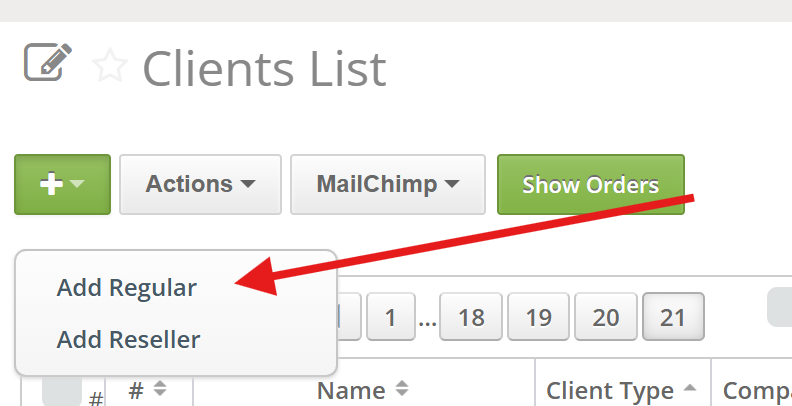
- Go to Orders -> Clients List.
- Click + Add.
- Choose the appropriate client type.
- Enter the client details.
- Save the record.
Client Information
| Name | The client’s full name in Valigara. |
| Username | Used by the client to access the catalog. |
| Password | Used by the client to log in. |
| Company | The client’s company name. |
| The client's email address. Used for communication or email campaigns. | |
| Phone, Country, Address | Used for contact and shipping details. |
| Comments | Internal notes. These are not visible to the client. |
| Emails of contact person | Extra emails for communication. |
| Description | Extra details. |
| Not in mailing list | To deactivate any email campaigns for client. |
| Created | The date when the client record was created. |
| Tags | Used for filtering and organizing clients. |
Reseller type Clients additionally have the following fields:
| Discount, % | Defines the percentage discount applied to the selected catalog price for this reseller. |
| Price to show | Defines which product price field will be displayed to this reseller in the catalog. |
| Currency | Defines the currency shown to the reseller. The system uses the selected price field value as-is. If currency conversion is needed, create an additional price field calculated according to the relevant exchange rate |
| Payment terms | Comments on client's agreed payment |
| Show search | Whether to show the search engine on Catalog. |
| Show all products | Should the client see all products after login, or products defined in "Client Catalog" |
| Disable submit order for resellers | Prevents the Client from creating an order directly from VSite. |
Where client types are used
Client types are relevant in multiple areas:
- Orders and CRM records
- Offline order handling
- VSite private client catalogs
- VCatalog access and pricing setup
 | You can import your clients from any external sources |
Was this article helpful?
That’s Great!
Thank you for your feedback
Sorry! We couldn't be helpful
Thank you for your feedback
Feedback sent
We appreciate your effort and will try to fix the article