The Inventory Settings page controls how Valigara updates product and gemstone stock and synchronizes inventory with connected sales channels.
Products Stock
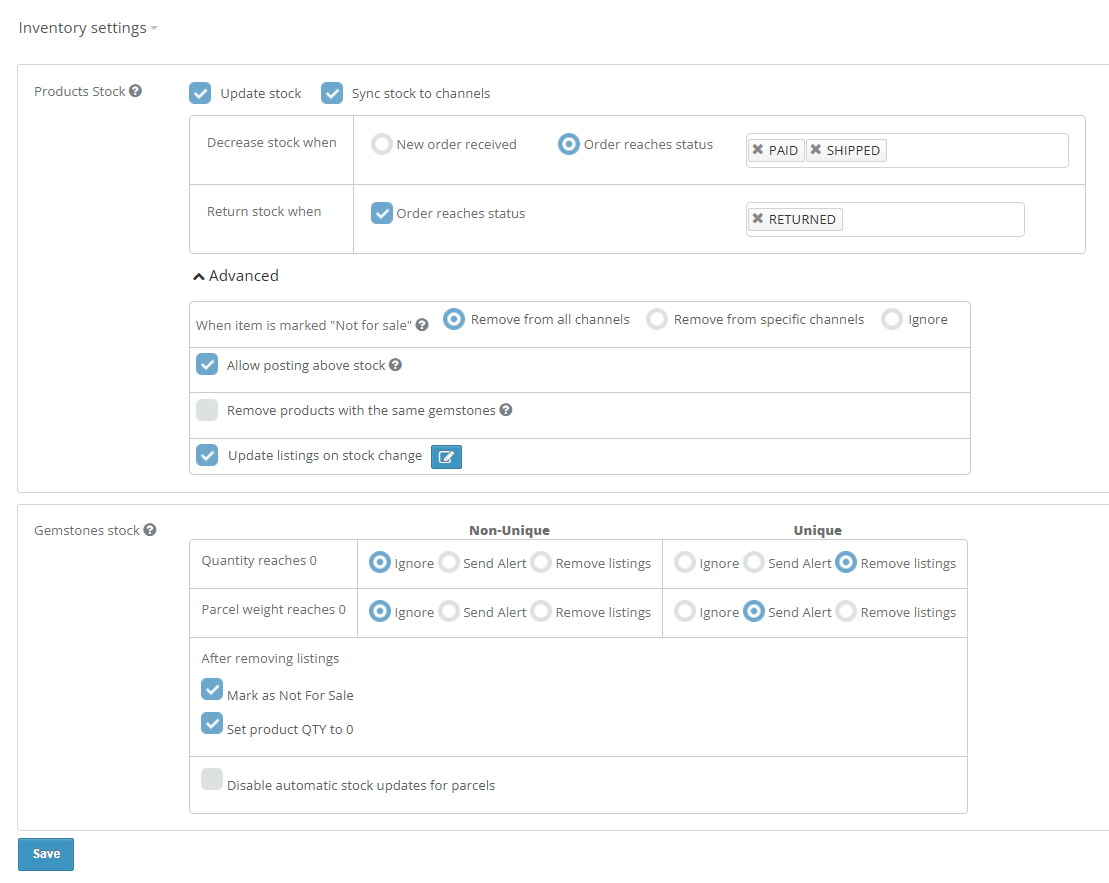
Use the Products Stock settings to define when Valigara changes product quantity and when these changes are synchronized with connected channels.
- Update stock - enables automatic product quantity updates in Valigara.
- Sync stock to channels - sends stock changes to connected sales channels.
When Update stock is enabled, configure when stock should be decreased or returned.
Decrease stock when
- New order received - decrease product stock as soon as a new order is registered in Valigara.
- Order reaches status - decrease stock only when the order reaches one of the selected statuses.
Return stock when
- Order reaches status - return the item quantity to stock when the order reaches one of the selected statuses, for example Returned.
Advanced Stock Settings
When item is marked "Not for sale"
Choose what should happen to existing marketplace listings when a product is marked Not for sale in Valigara.
- Remove from all channels - end all active listings and prevent future posting, scheduling, and relisting.
- Remove from specific channels - remove the product only from selected channels.
- Ignore - keep existing listings and schedules unchanged.
Allow posting above stock
Allows products to be posted or revised with a channel quantity higher than the actual stock quantity in Valigara.
Important: Listings posted with a manually defined quantity may not follow later inventory changes. For example, if an eBay listing is posted with a manually defined quantity and the product later sells out on another channel, the eBay listing may remain active.
Remove products with the same gemstones
When a product is deleted, remove marketplace listings containing the same gemstone(s).
This helps prevent a gemstone from remaining available online through another product after the original product has been deleted.
Choose which related products should be affected:
- Loose Products - remove only related products with the Loose product class.
- All products - remove all products containing the same gemstone(s).
Update listings on stock change
Updates marketplace listings on all or selected channels when the product stock quantity changes.
Gemstones Stock
Gemstone stock rules define what Valigara should do when a gemstone becomes unavailable.
Rules can be configured separately for Non-unique and Unique gemstones.
| When | Non-unique | Unique |
|---|---|---|
| Quantity reaches 0 | Ignore / Send Alert / Remove Listings | Ignore / Send Alert / Remove Listings |
| Parcel weight reaches 0 | Ignore / Send Alert / Remove Listings | Ignore / Send Alert / Remove Listings |
The available actions are:
- Ignore - do not make any changes to related listings.
- Send Alert - notify the user that the gemstone is out of stock and requires attention.
- Remove Listings - remove marketplace listings of products containing the gemstone.
After removing listings
This section is displayed when at least one gemstone stock rule is set to Remove Listings.
- Mark as Not For Sale - mark the related products as Not For Sale in Valigara.
- Set product QTY to 0 - set the quantity of the related products to 0.
Disable automatic stock updates for parcels
Enable this option to prevent automatic stock updates for gemstones using the parcel unit type.
Was this article helpful?
That’s Great!
Thank you for your feedback
Sorry! We couldn't be helpful
Thank you for your feedback
Feedback sent
We appreciate your effort and will try to fix the article