Sometimes merchants need to replace existing product SKUs in bulk with new values: for example, to align SKUs with an ERP system, restore historical SKU structures, or implement a custom SKU format.
With Valigara, you can update product SKUs using an Excel file and the SKU Generator.
- Create a new String Additional Field for the New SKU
- Update Products from Excel file. Prepare a file containing:
- Current SKU → used to identify the product
- New SKU field → containing the new SKU values. Map to the newly created field
- Update the SKU GeneratorMask
- Go to Global Settings → SKU Generation
- Update the SKU mask to use the New SKU field only
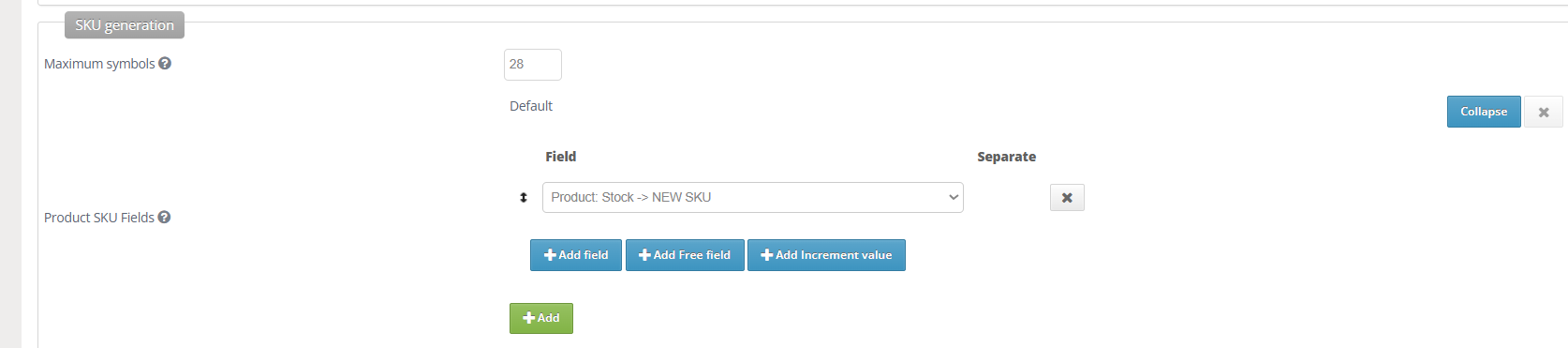
- Generate New SKUs
- Go to Catalog
- Select the relevant products
- Go to Actions → Generate SKUs
The system will regenerate the product SKUs using the new field values.
If necessary:
- Revert the SKU Generator mask back to its previous configuration after the update.
- Remove NEW SKU additional field
Was this article helpful?
That’s Great!
Thank you for your feedback
Sorry! We couldn't be helpful
Thank you for your feedback
Feedback sent
We appreciate your effort and will try to fix the article