Dynamic fields allow adding any product field to the generated content automatically. They can be used in Description Generators, Title Generators, Listing templates for channels, Shipping notes, Orders print commands, and more.
Inserting a Dynamic Field
All product, model, and gemstone fields are available. Field names use the field Alias (Slug), set in Catalog → Additional Fields.
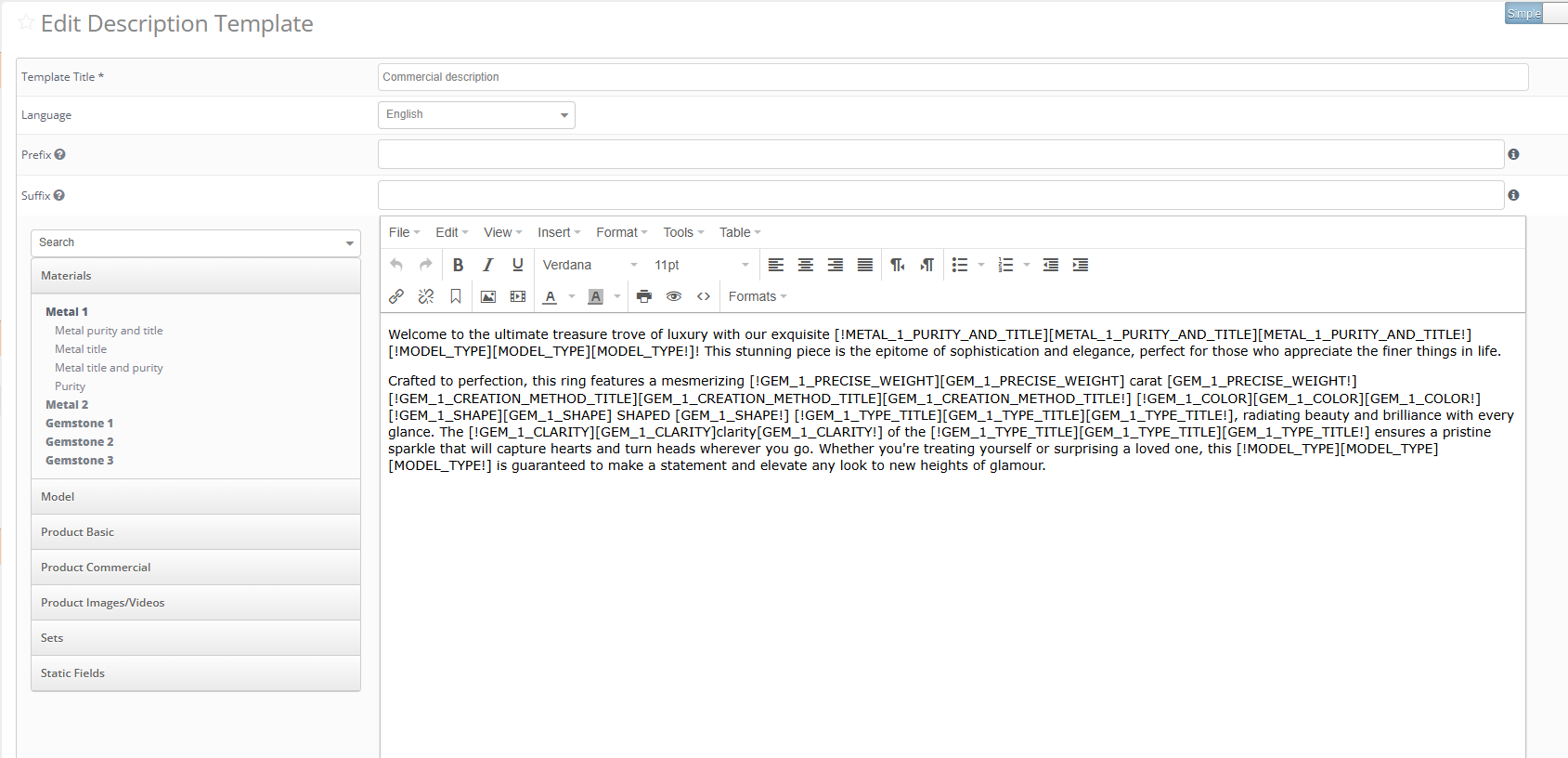
- Place the cursor where the value should appear in the template
- Click the desired field in the parameters list on the left
- Set the Insert and Case options
- Click Insert

Insert Types
Value — inserts the field value into the text. Use for standard fields that have values for all products, such as model code, model type, metal, etc.
Syntax: [FIELD_NAME]
| Template | Result |
|---|---|
| This is a beautiful ring, made of [METAL_1_NAME] | This is a beautiful ring, made of White Gold |
Value with Condition — inserts the value and hides the entire block if the field is empty. See Conditional Blocks below.
Case Options
| Option | Result | Use |
|---|---|---|
| No Change | White Gold | When exact value is required |
| ALL CAPS | WHITE GOLD | To stress the value |
| First word | White gold | At the beginning of a sentence |
| Each Word | White Gold | In titles, for readability |
| no caps | white gold | In the middle of a sentence |
Conditional Blocks
A conditional block wraps text that should only appear when a field has a value. If the field is empty, the entire block is hidden.
Opening tag: [!FIELD_NAME]
Closing tag: [FIELD_NAME!]
The block between the tags can include static text, other dynamic fields, and case options.
| Template | Result |
|---|---|
| This is a beautiful ring, made of [METAL_1_NAME]. [!METAL_2_NAME]It is combined with small [METAL_2_NAME] inlays.[METAL_2_NAME!] | Product 1 (no Metal 2): This is a beautiful ring, made of White Gold. Product 2 (has Metal 2): This is a beautiful ring, made of Yellow Gold. It is combined with small White Gold inlays. |

Nested Conditions
Conditions can be nested inside each other. For example:
- Outer condition: shows or hides the entire gemstone block based on gemstone code
- Inner condition: shows or hides a specific line (e.g. gemstone clarity) only when that field has a value
Example:
[!GEMSTONE_1_CODE]Gemstone: [GEMSTONE_1_TYPE]. [!GEMSTONE_1_CLARITY]Clarity: [GEMSTONE_1_CLARITY].[GEMSTONE_1_CLARITY!][GEMSTONE_1_CODE!]
Maximum nesting depth is not limited, but keep conditions readable. Each opening tag must have a matching closing tag.
Was this article helpful?
That’s Great!
Thank you for your feedback
Sorry! We couldn't be helpful
Thank you for your feedback
Feedback sent
We appreciate your effort and will try to fix the article